Load plan
Load planning for trucks and sea containers
The app arranges cargo inside the body taking weight, fragility and stacking rules into account, shows the result in 3D and produces ready documents for the warehouse and the driver.
What it does
Three-dimensional packing that respects dimensions, weight, tiers, rotation and the required share of support. Whatever does not fit goes to the next vehicles.
Load on the fifth wheel and on the bogie, with the cargo shifted along the body automatically to stay within the limit.
Camera orbit, five fixed views, exploded tiers, numbered items. Any item can be moved by hand when the warehouse knows better.
Print and PDF, an Excel export with the coordinates of every item, and a separate sheet in Turkish for the receiving side.
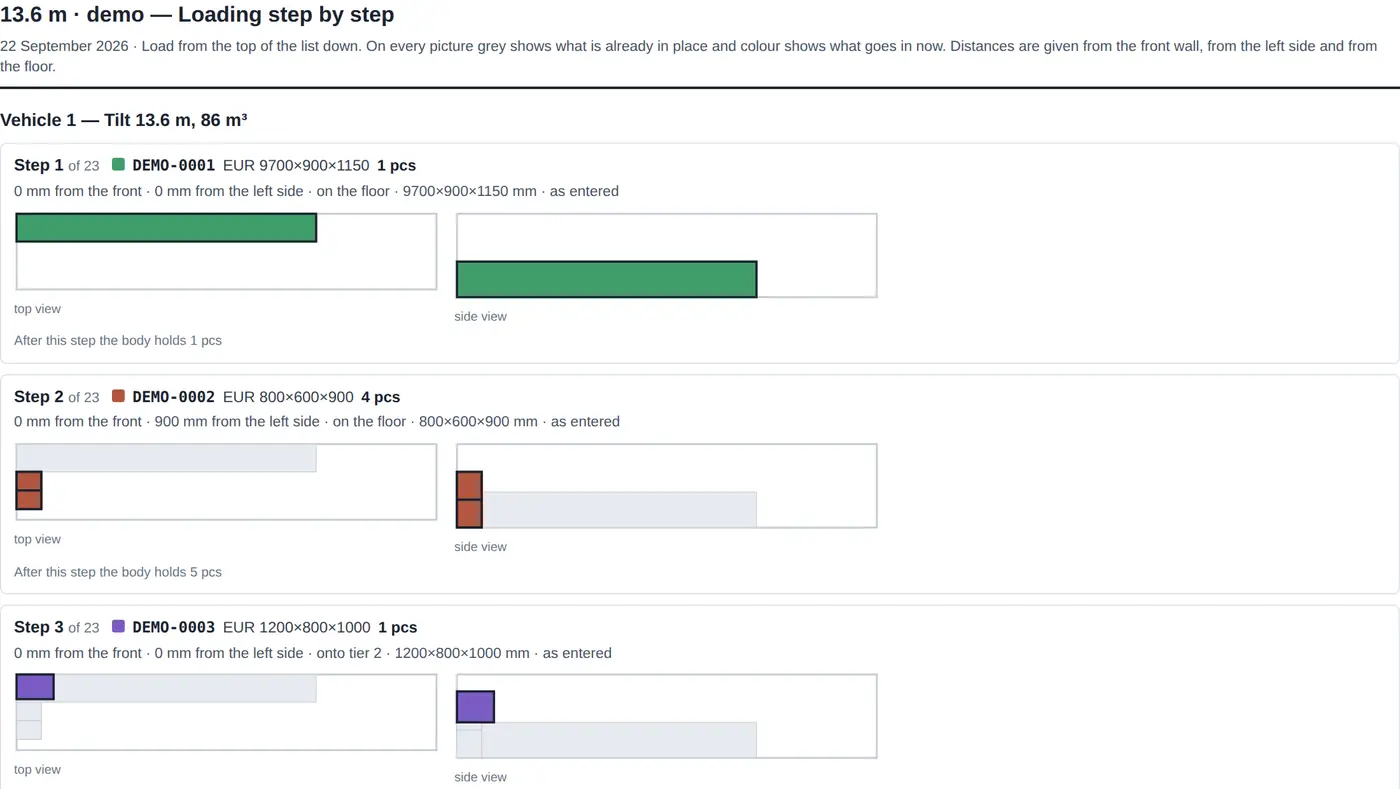
A separate report for the warehouse: what goes in next, how far from the front wall and from the side, on which tier.
A supplier file is parsed into items. Recurring items are saved as samples and added with a single click.
Vehicles
Containers 20DV, 40DV, 40HC, 45HC and reefers. Curtain-side semi-trailers 13.6 m, Mega, Jumbo, isotherm, reefer. Light trucks from a van to a ten-tonner. A custom body can be created with any dimensions.
What it is used for
- Knowing before the truck is ordered whether the shipment fits and how many vehicles it takes.
- Agreeing the layout with the client and the warehouse instead of describing it in words.
- Giving the driver and the loaders a plan that shows every item and its turn.
- Measuring loading metres and the space still left to fill.
Where it runs
Chrome, Firefox, Safari, Edge, Yandex Browser. Nothing to install.
Android and iPhone: added to the home screen straight from the browser and opened full screen. No separate app from a store is needed.
It opens without a connection and shows the last plan used on this device. Changes reach the server as soon as the link is back.
Russian, English and Turkish — printed reports and exports included.
Access
Sign in with an account issued by the administrator. A finished plan can be sent as a view-only link — to a client, a colleague or the warehouse: no sign-in, nothing to change.
Frequently asked questions
How many euro pallets fit into a 13.6 m trailer?
A 13.6 m curtain-sider (13600×2450×2450 mm inside) takes 33 euro pallets of 1200×800 in a single tier — eleven rows of three. A second tier is possible when the cargo stacks and both height and payload allow it. The program works this out from your actual cargo rather than from a formula: weight, height, support ratio and the “nothing on top” rule are all taken into account.
What is a loading metre (LDM) and how is it calculated?
A loading metre is one metre of a 2.4 m wide cargo floor. A 1200×800 euro pallet takes 0.4 LDM, a Finnish 1200×1000 one takes 0.5. Cargo can be entered directly in loading metres, and the report shows how many LDM are used, how many there are in total and how many are still free.
How do I calculate the loading of a 20 ft and a 40 ft container?
Containers 20DV (5898×2352×2393 mm inside), 40DV, 40HC, 45HC and reefers are already in the catalogue. Pick the container, enter the places — the program arranges the cargo, shows the plan in 3D and states plainly what did not fit and how many units are needed.
Why is this better than a spreadsheet?
A spreadsheet gives you the volume but not the answer to whether the cargo physically fits. Here you see the arrangement in 3D, the unloading order by destination, the axle loads and a ready printout for the warehouse and the driver. The plan can be sent as a view-only link — the recipient needs neither an account nor the program.
Does anything have to be installed?
No. The program runs in the browser on a computer, a tablet and a phone; on a phone it can be added to the home screen and opened like an ordinary app. The arrangement is computed on the device itself, so a slow connection does not hold the calculation back.
How do I get access?
Send a request from this page: name, company, e-mail and phone. The administrator reviews it and sends a login and a one-time password to that e-mail, which you change at the first sign-in.
Europiir · europiir.io · Data and privacy